DevOps CI/CD Explained
An introduction to DevOps, continuous integration, continuous delivery and deployment, CI/CD pipelines, tools, and benefits.
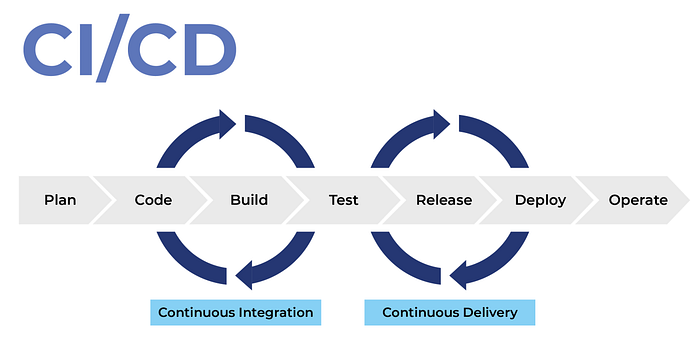
Introduction
DevOps is a set of cultural practices, principles, and tools that bridge the gap between software development and IT operations. Its goal is to shorten the software development lifecycle while delivering features, fixes, and updates quickly and reliably.
One of the core practices of DevOps is CI/CD (Continuous Integration and Continuous Delivery/Deployment). Together, these practices help teams build, test, and release software in small, frequent, automated steps.
Continuous Integration (CI)
Continuous Integration is the practice of frequently integrating code changes into a shared repository, often multiple times a day.
How it works
- A developer commits code changes to the repository.
- A CI server, such as Jenkins, GitHub Actions, or GitLab CI, automatically starts a workflow.
- The workflow checks out the repository, builds the code, runs unit tests and static analysis, and reports errors quickly.
Why CI matters
Without CI, projects can fall into “merge hell.” For example, one developer may build an API while another builds a user interface that depends on it. If they work separately for months, their changes may conflict, and reconciling them late can require extensive rework.
With CI, small changes are integrated regularly. Integration problems surface sooner, while changes are still manageable.
Popular CI tools: Jenkins, GitHub Actions, GitLab CI, Travis CI, and CircleCI.
Continuous Delivery (CD)
Continuous Delivery extends CI by keeping software in a deployable state. Each successful build is packaged, tested, and prepared for release, but deployment to production still requires manual approval.
For example, after CI succeeds, an application build can be prepared for a staging environment. A QA team can test it, and an approved build can then be released to production.
Tools for CD: Spinnaker, Argo CD, Harness, and AWS CodePipeline.
Continuous Deployment
Continuous Deployment goes a step further: every change that passes the automated checks is deployed to production without a manual approval step.
This approach depends on strong automated tests, monitoring, and rollback strategies because a faulty change can reach users quickly.
CI/CD pipeline example with GitHub Actions
The following example runs a Node.js build and tests for pushes and pull requests targeting main. Deployment runs only after the validation job succeeds and the workflow is running on main.
1
2
3
4
5
6
7
8
9
10
11
12
13
14
15
16
17
18
19
20
21
22
23
24
25
26
27
28
29
30
31
32
33
34
35
36
37
38
39
40
41
42
43
44
45
46
47
name: CI/CD Pipeline

on:
  push:
    branches:
      - main
  pull_request:
    branches:
      - main

permissions:
  contents: read

jobs:
  build-and-test:
    runs-on: ubuntu-latest
    steps:
      - name: Checkout code
        uses: actions/checkout@v4

      - name: Set up Node.js
        uses: actions/setup-node@v4
        with:
          node-version: "20"

      - name: Install dependencies
        run: npm ci

      - name: Run tests
        run: npm test

      - name: Build application
        run: npm run build

  deploy:
    needs: build-and-test
    if: github.event_name == 'push' && github.ref == 'refs/heads/main'
    runs-on: ubuntu-latest
    steps:
      - name: Checkout code
        uses: actions/checkout@v4

      - name: Deploy to GitHub Pages
        uses: peaceiris/actions-gh-pages@v4
        with:
          github_token: $
          publish_dir: ./build
Explanation
name: Names the workflow.on: Runs the workflow for pushes and pull requests targetingmain.jobs: Contains the tasks that make up the workflow.runs-on: Selects the runner environment, hereubuntu-latest.steps: Lists the tasks performed by a job.actions/checkout@v4: Checks out the repository.actions/setup-node@v4: Configures Node.js.npm ci,npm test,npm run build: Install locked dependencies, run tests, and build the app.needs: build-and-test: Ensures deployment waits for successful validation.- Deployment condition: Runs deployment only for a push to
main, not for pull requests. publish_dir: Identifies the directory containing the generated site.
For a real project, review the deployment action, permissions, branch protections, and required secrets before enabling production deployment. Keep write permissions limited to the deployment job and use the platform’s supported deployment mechanism.
Benefits of CI/CD in DevOps
- Faster delivery: Automates repetitive build and release tasks.
- Early problem detection: Finds bugs during integration rather than weeks later.
- Higher code quality: Frequent testing improves confidence in changes.
- Reduced risk: Smaller changes are easier to troubleshoot and roll back.
- Collaboration and transparency: Shared workflows improve communication between development and operations teams.
Real-world examples
- Amazon: The article cites frequent deployments as an example of how CI/CD can support rapid software delivery.
- Netflix: Automated pipelines and chaos engineering practices help test reliability and fault tolerance.
- Etsy: CI/CD adoption helped reduce deployment times from hours to minutes, enabling faster experimentation.
Conclusion
CI/CD is an engine of modern DevOps practices. By automating integration, testing, and delivery, teams can release software faster and with greater confidence. Whether a team deploys weekly or many times a day, a well-designed pipeline helps make releases repeatable and reliable.
Originally published on Medium.