Pivoting Techniques
An overview of port forwarding and multi-hop pivoting in authorized security assessments.
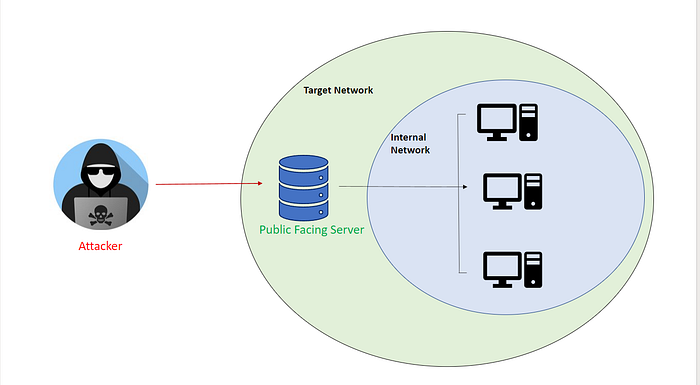
Pivoting is a post-exploitation technique that allows an authorized tester to use a compromised system as a bridge to reach machines and networks that would otherwise be inaccessible. Modern networks are often segmented, with public-facing servers in a demilitarized zone (DMZ) and sensitive assets such as databases, domain controllers, and internal applications isolated behind firewalls and access controls. From an external perspective, these internal resources may be unreachable directly.
During an authorized assessment, a foothold on one host can provide access to networks that host can already reach. Pivoting can therefore reveal internal services and demonstrate how segmentation, lateral movement, and privilege boundaries affect risk. In real-world attacks, the same weaknesses can turn a web-server compromise into a broader breach, which is why defenders should tightly control routes, credentials, and egress paths.
1. Port Forwarding
Local port forwarding
Local forwarding makes a service reachable through a port on your own machine, using the pivot host’s network access:
1
ssh -L 8080:10.0.0.5:80 user@pivot_host
For example, if the authorized pivot host can reach an internal application at 10.0.0.5:80, the tunnel makes it available to the tester at localhost:8080.
Remote port forwarding
Remote forwarding exposes a service from the attack machine to a port on the pivot host:
1
ssh -R 8080:localhost:80 user@pivot_host
This can be useful in a controlled lab when a system on the pivot side needs to connect back to a service on the tester’s machine.
6. Double Pivoting
A double pivot uses two intermediate systems to reach a network that is not directly accessible from the tester:
DMZ web server → internal application server → database subnet
This may use chained SSH tunnels or multiple routes through an authorized assessment framework.
Scenario
Suppose a tester is assessing a company network with explicit authorization:
- Initial foothold: A web server in the DMZ (
192.168.1.10) can reach the internal application network (10.0.0.0/24), but not the database network. The tester cannot directly reach the internal application subnet. - Second pivot: From the web server, the tester gains authorized access to an internal application server (
10.0.0.5).
The application server can reach a database network (172.16.0.0/24), which is not directly reachable from the DMZ.
Goal: Reach a database server at 172.16.0.8 through the two pivots.
Step 1: First pivot (tester to DMZ web server)
Create a SOCKS proxy through the first authorized pivot:
1
ssh -D 9050 user@192.168.1.10
In the article’s scenario, a proxy-aware client can then reach permitted services on the 10.0.0.0/24 subnet through the web server. Keep discovery and testing within the approved scope.
Step 2: Second pivot (DMZ web server to internal application server)
After obtaining authorized access to 10.0.0.5, establish a second tunnel. The original article uses Chisel as an example.
On the tester’s machine:
1
chisel server -p 8000 --reverse
On the internal application server:
1
chisel client 192.168.1.100:8000 R:1080:172.16.0.8:PORT
Replace PORT with the specific service port approved for testing. The tunnel should be limited to the required destination and service; avoid broad subnet exposure unless it is explicitly within the rules of engagement.
Step 3: Access the database service
Configure the approved proxy client to use the SOCKS proxy on port 9050, then connect only to the in-scope database service through the chained pivots. Record the route and test activity so that the network owner can validate the segmentation findings.
Originally published on Medium.