Kubernetes for Everyone: TryHackMe Walkthrough
A TryHackMe walkthrough covering Grafana file traversal, SSH access, Kubernetes secrets, pod storage, and job output.
This walkthrough covers an authorized TryHackMe lab. Run scans and testing only against the room instance or other systems you are explicitly permitted to assess.
Overview
The challenge chain began with a Grafana directory-traversal vulnerability that exposed files on the server, including /etc/passwd. The discovered credentials provided SSH access. From there, I used the k0s Kubernetes command-line client to inspect cluster secrets, pods, and jobs. The cluster contained base64-encoded secret data, a flag in a container volume’s Git history, and a job output whose SHA-1 hash revealed the final answer.
Access the Cluster
To interact with a Kubernetes cluster, you need to identify where it is running and obtain valid access. The room begins with network enumeration.
1. Nmap scan
1
nmap -p- -A -T4 -sCV -oN nmap_scan.txt <ROOM_IP>
The scan found five open ports:
| Port | Service | Observation |
|---|---|---|
| 22/tcp | SSH | OpenSSH 7.6p1 on Ubuntu |
| 111/tcp | RPCBind | RPC service |
| 3000/tcp | HTTP | Grafana login redirect |
| 5000/tcp | HTTP | Werkzeug application titled “Etch a Sketch” |
| 6443/tcp | HTTPS | Kubernetes API server; returned 401 Unauthorized without credentials |
The API server’s response showed that the service was reachable but required authentication.
2. Web server on port 3000
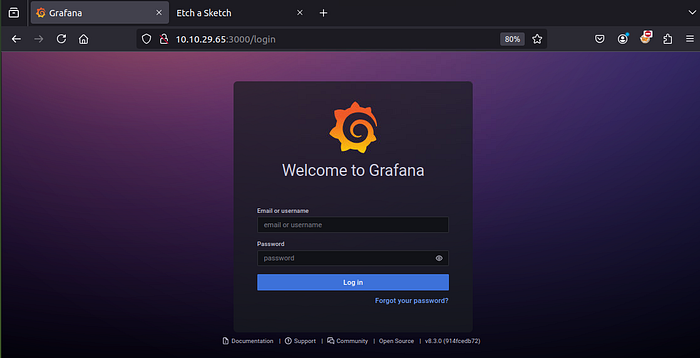
Port 3000 hosted Grafana, an open-source platform for visualizing and monitoring data. The login page required credentials that had not yet been discovered.
3. Web server on port 5000
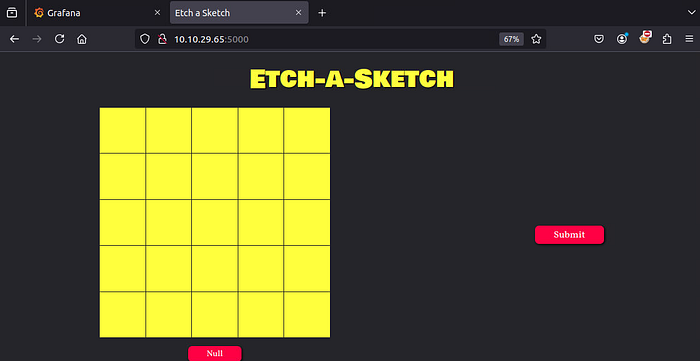
The service on port 5000 displayed a drawing interface that appeared to ask the user to etch or sketch something and submit it.
4. Kubernetes API on port 6443
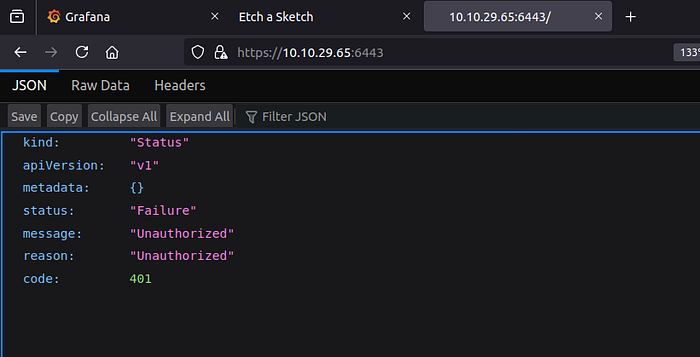
Opening https://<ROOM_IP>:6443 returned an authentication error. The Kubernetes API was alive, but unauthenticated requests were refused.
Exploitation
I first checked the web application’s page source for comments, linked CSS, and JavaScript:
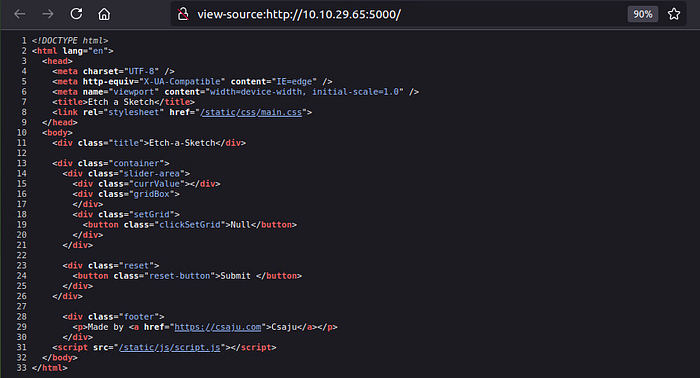
An interesting link in the CSS led to a note associated with a guest user:
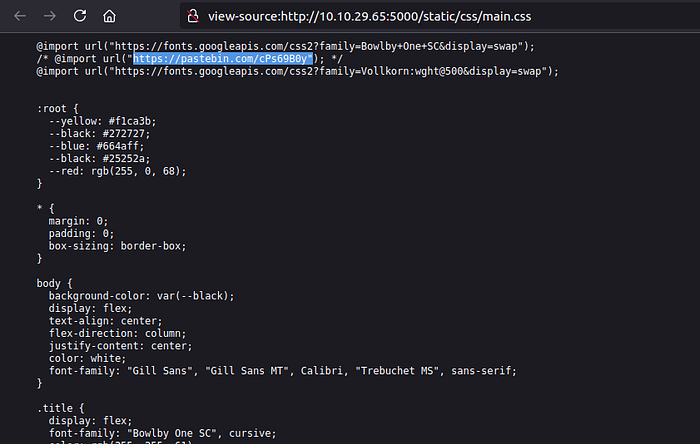
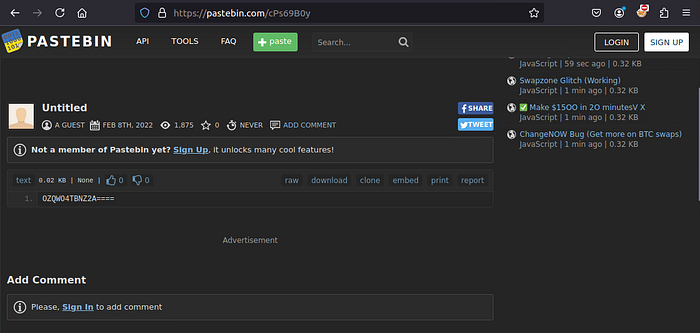
The string OZQWO4TBNZ2A==== appeared to be encoded. A cipher identifier indicated Base32:
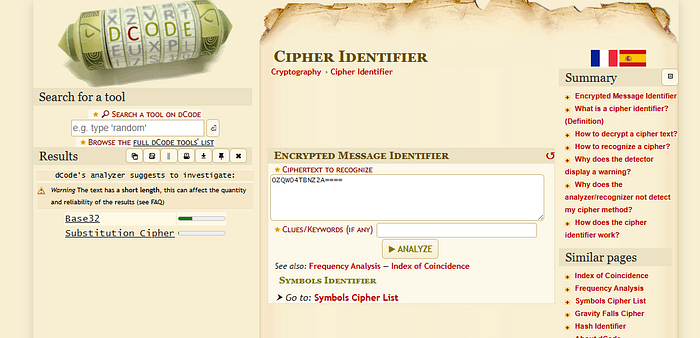
Decoding it produced the username:
1
echo "OZQWO4TBNZ2A====" | base32 -d
1
vagrant
I then investigated the Grafana version and found references to directory traversal vulnerabilities affecting some releases. In the lab, the issue allowed reading /etc/passwd. The relevant entry exposed the password associated with the Grafana account:
1
grafana:x:472:0:hereiamatctf907:/home/grafana:/sbin/nologin
The credentials identified for the room were:
Username:
vagrant
Password:hereiamatctf907
Your Secret Crush
I used the discovered credentials to connect to the room over SSH:
1
ssh vagrant@<ROOM_IP>
The account had broad sudo permissions:
1
2
3
User vagrant may run the following commands on johnny:
    (ALL : ALL) ALL
    (ALL) NOPASSWD: ALL
This meant the account could run commands as root. From the root shell, I inspected Kubernetes resources using the k0s distribution’s bundled kubectl:
k0sis the Kubernetes distribution used by the room.kubectlis the command-line tool for interacting with the cluster.get secretlists or retrieves Kubernetes Secret objects.
The cluster showed two secrets in the default namespace:
1
2
3
NAME                  TYPE                                  DATA   AGE
default-token-nhwb5    kubernetes.io/service-account-token  3      3y188d
k8s.authentication    Opaque                                1      3y188d
I retrieved the k8s.authentication secret in YAML format:
1
k0s kubectl get secret k8s.authentication -o yaml
1
2
3
4
5
6
7
8
apiVersion: v1
data:
  id: VEhNe3llc190aGVyZV8kc19ub18kZWNyZXR9
kind: Secret
metadata:
  name: k8s.authentication
  namespace: default
type: Opaque
The id value was Base64-encoded. Decoding it revealed the room flag:
1
THM{yes_there_$s_no_$ecret}
Answer:
THM{yes_there_$s_no_$ecret}
Powerhouse of Pod’s Storage
Next, I listed pods across all namespaces:
1
k0s kubectl get pods -A
1
2
3
4
5
6
7
NAMESPACE    NAME                              READY   STATUS
internship   internship-job-5                  0/1     Completed
kube-system  kube-router-vsq85                 1/1     Running
kube-system  metrics-server-74c967d8d4-pvv8l   1/1     Running
kube-system  kube-api                          1/1     Running
kube-system  coredns-6d9f49dcbb-9vbff           1/1     Running
kube-system  kube-proxy-jws4q                   1/1     Running
After exploring the host’s container storage, I found the pod filesystem under the k0s containerd snapshot directory:
1
/var/lib/k0s/containerd/io.containerd.snapshotter.v1.overlayfs/snapshots/38/fs/home/ubuntu/jokes
The directory contained several joke files and a Git repository:
1
2
3
4
5
crush.jokes
dad.jokes
mom.jokes
programming.jokes
.git/
Reviewing the repository history revealed an earlier commit that added king.jokes. Its diff contained the volume flag:
1
THM{this_joke_is_cold_joke}
Answer:
THM{this_joke_is_cold_joke}
Hack a Job at Fang
The pod listing also showed a completed job in the internship namespace. I inspected the job details in JSON format:
1
k0s kubectl get jobs -n internship -o json
In the job’s container specification, the command included a SHA-1-looking string:
1
26c3d1c068e7e01599c3612447410b5e56c779f1
The output indicated that the job had executed an echo command with that value. I identified it as a SHA-1 hash and used a hash-identification service to confirm the format:
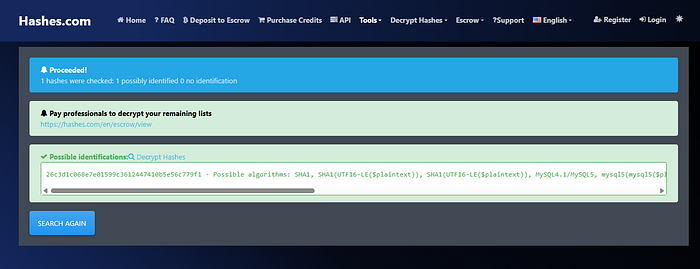
The original walkthrough used Hashcat or CrackStation with a wordlist to recover the value:
1
hashcat -m 100 -w 3 -D 1,2 hash.txt /usr/share/wordlists/rockyou.txt
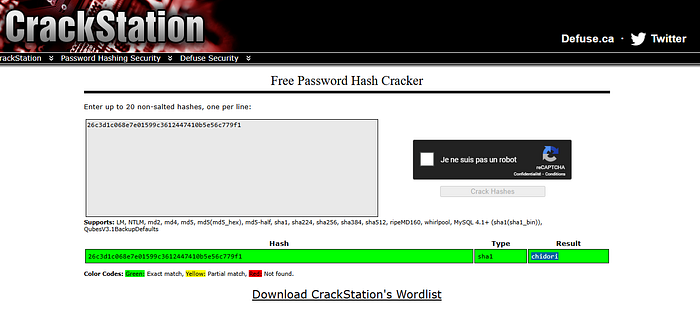
The recovered secret was chidori.
Question: What’s the secret to the FANG interview?
Answer:chidori
Conclusion
This room connected several ideas: service enumeration, a Grafana file-disclosure issue, SSH access, sudo permissions, Kubernetes Secret inspection, container-volume data, Git history, and job output. It demonstrated how information exposed at one layer can provide a path to investigating another layer of a Kubernetes-hosted environment.
Originally published on Medium.